> For the complete documentation index, see [llms.txt](https://help.cumuluspro.net/llms.txt). Markdown versions of documentation pages are available by appending `.md` to page URLs; this page is available as [Markdown](https://help.cumuluspro.net/configuration-guide/performance-tuning-by-throttling.md).
# Performance Tuning by Throttling
This article explain Performance Tuning by Throttling
In Straatos, each automated workflow step or activity queues and processes tasks in parallel. However, not all queued tasks within a step or activity are processed simultaneously. Straatos dynamically manages the throughput of each automated step or activity by adjusting both:
* The number of "ready-for-process" tasks.
* The number of processing threads running in parallel.
This adjustment, known as throttling, ensures efficient resource utilization and controlled task execution.
Both of these parameters can be configured by setting the following in a workflow step or activity:
* Number of Instances:
* Controls the number of "ready-for-process" tasks.
* Number of Threads:
* Defines the number of processing threads running in parallel.
***
### **Why do we need to throttle?**
Throttling is essential when an automated service task sends information and data to an external service that has limitations on the number of tasks it can accept and process.
By controlling the number of tasks being sent, throttling helps:
* Prevent overloading the external service.
* Ensure smooth and reliable data transmission.
* Optimize system performance and stability.
This approach ensures that workflows operate efficiently while respecting external system constraints.
***
### **Configuration task Throttles and Threads**
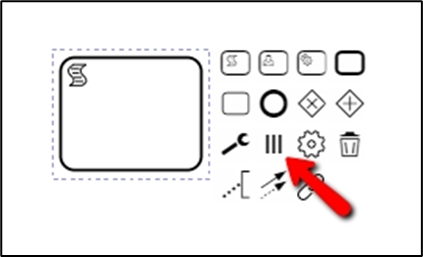
The throttle can be configured separately for each workflow step. In the Process Designer, click on an activity, then click on the 'Set maximum number of threads' icon.
Throttling can be configured separately for each workflow step. To set the throttle limit in the Process Designer:
1. In the Process Designer click on the desired activity.
2. Click on the "Set Maximum Number of Threads" icon.
3. Configure the maximum number of processing threads as needed.
In the pop up box, enter the settings:
***
### **Throttling the Maximum Number of Instances in an Activity**
* Purpose of Throttle:
* To limit the number of "ready-to-process" tasks in a workflow step.
* Scenario:
* In a busy environment, 1000 tasks are queued in a workflow step for sending documents to an OCR cloud service.
* OCR Service Limit:
* The service can accept only 20 documents at a time.
* Consequence of No Throttle:
* Setting the throttle parameter to 0 causes Straatos to attempt sending all 1000 tasks, resulting in an error.
#### **Maximum threads processed in parallel**
The purpose of Threading in Workflows helps to limit the number of processing threads servicing a queue of tasks, working in conjunction with the throttle parameter which manages the number of "ready-to-process" tasks.
* Synchronous Execution:
* In environments like JavaScript steps, the number of threads is effectively the same as the number of instances when the throttle is set to 0 (no throttling).
* The default number of threads is set to 10.
* The number of processing threads should not exceed the number of instances.
* Asynchronous Processing:
* This involves processing steps where a return result from the external service is not immediately required.
* The system triggers 10 processing threads at a time and waits for the completion of these threads before starting the next cycle.
* If the asynchronous service returns a result, a thread from the configured pool is used to handle this result, optimizing the use of computing resources.
In asynchronous workflows, most Straatos Service Tasks process documents behind the scenes. The throttle setting here is crucial for managing system resources efficiently and ensuring high throughput without significant performance degradation, even when many tasks are processed in parallel. For cases where task limitation is essential, especially in high-load environments, adjusting the throttle parameter is recommended to prevent bottlenecks and optimize overall system performance.
#### Optimizing Performance and Resource Utilization
* This setup optimizes computing resource usage, reduces bottlenecks, and maximizes throughput.
* Most Straatos Service Tasks process documents asynchronously in the background, so limiting throttling generally does not impact performance significantly.
* However, for workflows handling a large number of tasks in parallel, throttling should be adjusted appropriately.
If limiting task execution is required, it is recommended to configure the throttle option.